
Notes on the sound
Phonk BPM: find the tempo and understand 80 vs 160
What BPM means, why one passage can be counted at 80 or 160, and how to check tempo by ear. Tap the rhythm and practise with NO LIMITS PHONK tracks.
Calculate BPM ↓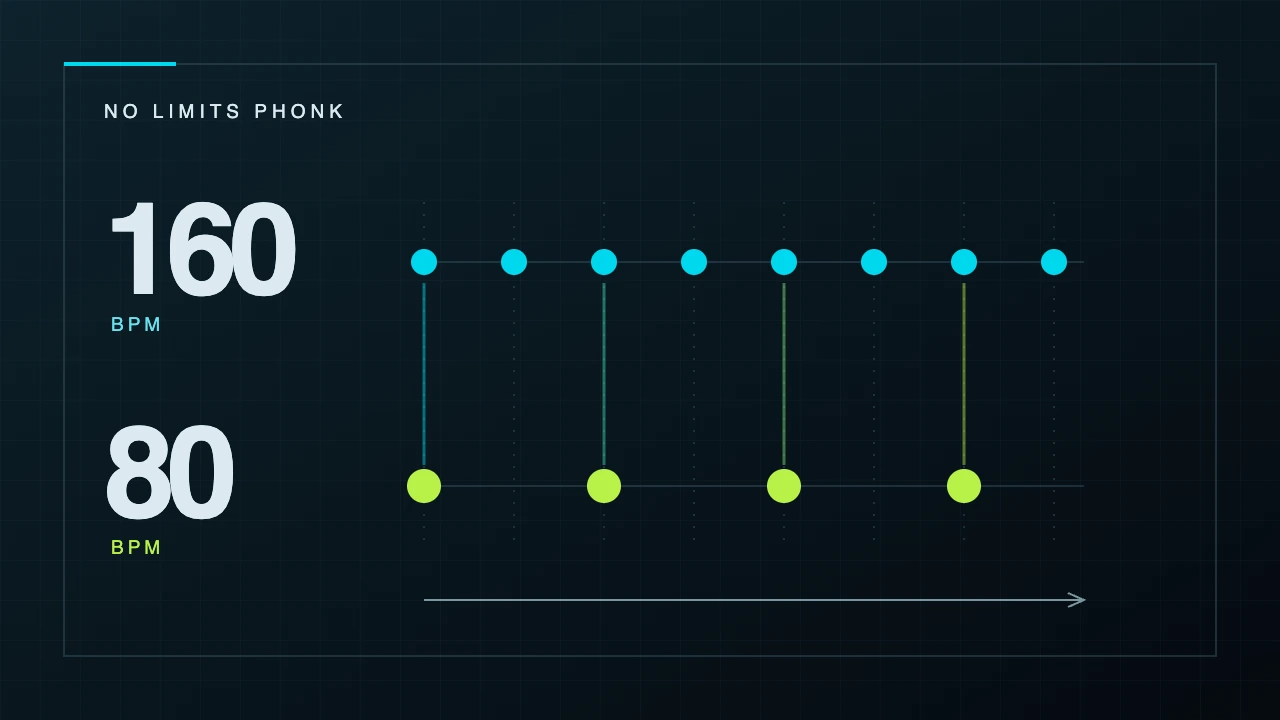
Notes & contents
Listening notes
- BPM counts beats per minute, not every sound in a track.
- 80 and 160 can describe different counting levels in one passage.
- The counter estimates your taps. Check the musical grid by ear.
You play some phonk, find a pulse and open a tempo detector: 160 BPM. Yet you nod along as if it were 80. That difference does not necessarily mean a mistake: music can be counted at different rhythmic levels.
Below are a tap-tempo counter, a visual example and practice with NO LIMITS PHONK recordings. Use them to explore rhythm or prepare a musical grid for an edit. Start a track yourself: neither the article nor the counter starts music automatically.
NO LIMITS PHONK / RHYTHM IN PRACTICE
Find your pulse
Play a track if you like, then tap along. We measure your tapping tempo — no audio upload needed.
Keyboard: focus the button → Space or Enter
Start with a few steady taps.
- Time between taps
- ms
- One 4/4 bar, quarter-note beat
- s
Half and double values are counting options. They do not change playback speed. The estimate uses up to the last 16 intervals.
The counter needs JavaScript. Without it, time the gap between steady beats and use the formula below.
What does BPM mean in music?
BPM stands for beats per minute. At 120 BPM, adjacent beats are half a second apart. It measures tempo: drum patterns, syncopation and melodies can differ at the same BPM. [1]
The pulse is a steady reference you can count or move to. It need not match every kick, hi-hat or cowbell hit. A part may skip beats, play between them or divide them into smaller units. Counting every sound in sequence is therefore an unreliable way to find the tempo. [1]
Phonk has no single compulsory BPM. When choosing music, listening to the actual track is more useful than forcing it into one universal genre number. Drum density and the placement of accents also affect the sense of movement.
Why might you get 80 or 160?
Imagine evenly spaced marks 0.375 seconds apart: 160 marks per minute. If you tap every other mark, the gap becomes 0.75 seconds and the counter reads 80. The sound has not changed; your counting level has. These are illustrative numbers, not measurements of our recordings.
An automatic analyser can also suggest a half or double value. In a music editor, check how the grid aligns with repeating phrases and strong beats. A pair of numbers alone cannot tell you which option is more useful for a particular arrangement. [2] [3]
Half-time feel describes a sense of slower underlying movement in a rhythm. Do not confuse it with physically slowing down a file. A slowed version changes playback speed or recording duration; counting differently leaves the recording itself unchanged. [2] [3]
How to use the tempo counter
Choose a passage with a steady rhythm. Listen for a few seconds, then tap the button to one regular pulse. Avoid trying to follow every note of the melody. With a keyboard, focus the button and press Space or Enter.
Repeat the measurement on the same passage. If the readings are close, use them as a guide. If the number jumps around, reset and try a simpler section. After a gap of more than three seconds, your next tap starts a new series. [2]
The counter uses up to the last 16 intervals between taps. The formula is BPM = 60,000 ÷ average interval in milliseconds. Five taps contain four intervals. The result is approximate: this tool does not listen to the track or determine its time signature.
Try it with our music
Play RESURGE from FULL CONTROL and choose a repeating passage. Find a steady pulse and tap along in the counter. Repeat while deliberately skipping every other beat: the reading should approach half the first value. We do not label a recording with a BPM without measuring it separately.
Now try LAST TRAIN from MY MOVE. Follow the accompaniment rather than counting syllables in the vocal: words can move differently from the underlying pulse. Both examples use published originals and the shared player at the bottom of the site.
What BPM gives you for editing
The number helps mark out time, but it does not choose cuts for you. At 160 BPM, one quarter-note beat lasts 0.375 seconds and one 4/4 bar lasts 1.5 seconds. Eight such bars last 12 seconds. This assumes constant tempo, 4/4 time and quarter notes as the BPM unit; it does not establish the structure of a particular song.
Your selected passage may start partway through a bar. First find the downbeat and check several repetitions, then place markers. If the grid gradually drifts, possible causes include an imprecise measurement, a different counting level or a tempo change within the recording.
A cut can follow the action in the frame and the musical phrase. It need not land on every hit. If you need music for your own video, check the terms for that exact recording: the counter and free listening do not change its usage permissions.
Quick answers
Can you find BPM without uploading a file? Yes: tap the pulse you hear. This tool calculates intervals in your browser, requests no microphone access and sends no taps to a server. Normal page and player network requests operate separately.
Why is the reading twice what I expected? You may have chosen a faster counting level. Compare the half value and check the musical accents; neither the smaller nor the larger number is automatically correct.
Does 160 BPM always sound more energetic than 80? One number is not enough. If these are two ways of counting the same passage, the sound has not changed at all. Across different tracks, rhythmic patterns, arrangement and pauses also shape the sense of movement.
Sources & further reading
Keep listening
Take one detail from the article into your next listen: a bass phrase, a pause, or the way a melody returns.
Explore the music
Notes on the sound4 min read
ChatGPT in NO LIMITS PHONK: From an Idea to a Music Project
How ChatGPT helps organize ideas, prepare useful materials and develop a multilingual website—with creative decisions, fact-checking and attention to the listener.
Read the article
Notes on the sound3 min read
Gaming phonk: choose a sound that fits your session
Choose background music for gaming, balance it with game audio and voice chat, and decide when a mix, individual tracks or a pause suits your session.
Read the article